

How to Verify Custom Printer Reliability
Table of Contents
- What Defines Printer Reliability
- 3D Printer Reliability Testing Methods
- Using Printer Hardware Stress Test Tools
- Printer Maintenance Best Practices
- Step-by-Step Verification Process
- Common Hardware Failure Points to Monitor
- Long-Term Cost of Ownership vs. Reliability
- Conclusion
Last Updated: August 15, 2026
What Defines Printer Reliability
Printer reliability is a combination of factors determining whether equipment consistently delivers quality output without unexpected failures. Reliability means your equipment produces consistent results across thousands of print cycles with minimal unplanned downtime, the difference between predictable operation and costly surprises during critical jobs.
Key reliability metrics to measure
Duty cycle represents the maximum pages a printer can handle monthly without degradation. Exceeding this limit accelerates failure regardless of equipment quality.
Mean time between failures (MTBF) indicates average operating hours before mechanical failure. A printer rated for 30,000 hours outperforms one rated for 10,000 hours.
Print quality consistency measures whether the first page matches the hundredth in color accuracy, registration, and finish. Printers that drift waste material on reprints and damage customer relationships.
Error rates track production halts from jams, firmware crashes, or component failures. Fewer interruptions mean higher productivity.
Why downtime costs matter
Unplanned downtime hits your bottom line immediately. A printer failure mid-job loses production time, wastes materials, and risks missed deadlines. For custom printing businesses, a single failure during a rush order can erase months of profit and damage client relationships. Preventative maintenance reduces downtime risk, especially when components are user-replaceable, avoiding dependency on factory service.
3D Printer Reliability Testing Methods
Real-world testing reveals weaknesses that marketing specs hide by exposing how equipment behaves under your specific conditions, materials, and production volumes.
Impact testing for hardware durability
Impact testing simulates mechanical stress from vibration, thermal cycling, and repeated component movement. Request the manufacturer's hardware validation reports documenting third-party impact testing results. These show whether independent labs validated the hardware under stress, which components wore first, and at what cycle count failures occurred. A printer surviving 500,000 cycles with only cosmetic wear demonstrates durability; one failing at 50,000 cycles signals risk.
Print quality consistency checks
Run multiple test prints across different design types and color profiles. Request at least 50 copies of the same design from the manufacturer using your actual designs or representative samples. Compare the first print to the 50th, checking for color drift where CMYK values shift and registration misalignment. For custom apparel printing, consistency is critical, a shirt printed day one should match one printed a week later under identical settings.
Using Printer Hardware Stress Test Tools
Hardware stress testing tools reveal failure points before they impact production by measuring component response to extended use and temperature fluctuations.
Thermal stress evaluation
Thermal stress testing cycles the printer through temperature extremes to expose weaknesses in solder joints and mechanical assemblies. Request thermal testing data documenting the temperature range tested and number of thermal cycles completed. A printer tested through 500 cycles from 50°F to 120°F proves more durable than one tested at narrower ranges. Pay attention to whether the printer automatically recalibrates color profiles during temperature changes, automatic recalibration prevents print quality degradation during seasonal swings.
Duty cycle and component wear assessment
Duty cycle testing runs the printer continuously at maximum capacity to measure when components degrade. Look for data on print head longevity; a print head rated for 500,000 pages lasts significantly longer than one rated for 100,000 pages. Since print head replacement is often the most expensive maintenance cost, this metric directly impacts long-term cost of ownership.
Printer Maintenance Best Practices
Maintenance directly impacts reliability. A printer receiving proper preventative care lasts longer and maintains quality consistency.
Preventative maintenance schedules
Establish a maintenance schedule based on manufacturer specifications and your production volume. Most printers require periodic cleaning of the paper path, roller inspection, and lubrication of moving parts. Document maintenance activities to identify patterns, if print quality degrades consistently after 10,000 prints, recalibrate color profiles at that interval. Follow recommended maintenance intervals precisely; a $50 cleaning appointment prevents $2,000 in repair costs.
Identifying serviceable components
Printers with user-replaceable parts reduce downtime and costs. Identify which components you can replace yourself versus which require factory service. Toner cartridges, paper trays, and sometimes print heads are user-replaceable; fuser units and circuit boards typically require factory technicians. Stock spare parts for components that fail predictably, if print head lifespan is 500,000 pages and monthly volume is 50,000 pages, you'll replace it every 10 months.
Step-by-Step Verification Process
Step 1: Request hardware specifications and validation reports
Contact the manufacturer and request complete technical specifications including duty cycle ratings, MTBF data, and third-party reliability testing reports. A manufacturer readily providing this documentation demonstrates confidence in their product. Cross-reference duty cycle against your anticipated monthly volume to identify mismatches before purchase.
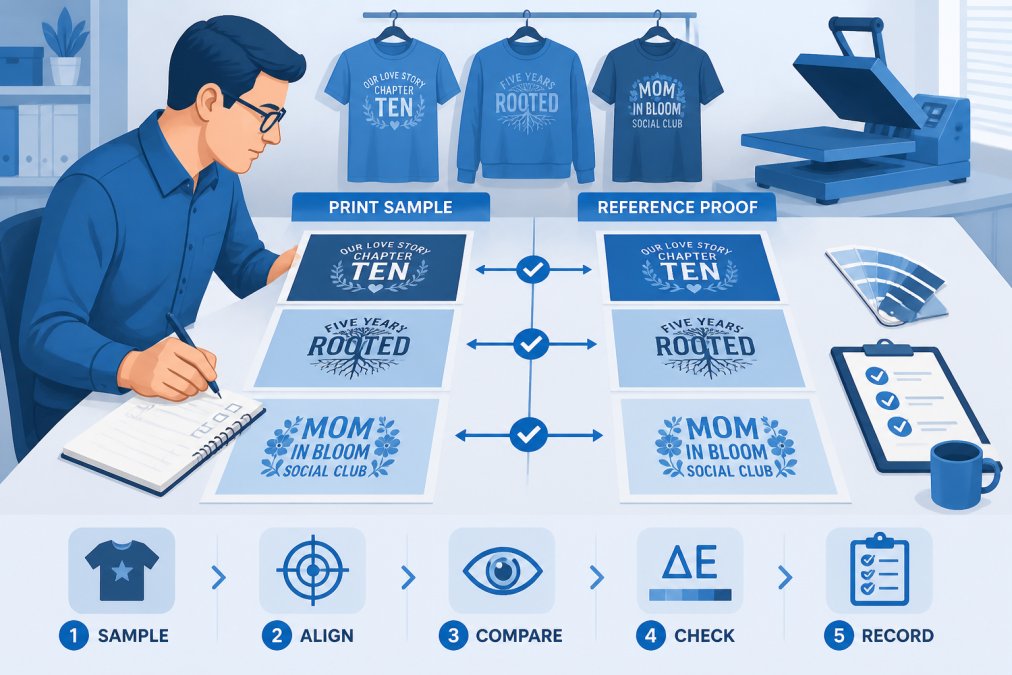
Step 2: Run print quality proofs with your designs
Request sample prints using your actual designs and materials. Ask for at least 50 copies of the same design to assess consistency. Evaluate CMYK color accuracy, registration precision, and finish durability. For custom apparel printing, color consistency matters enormously. A shirt that looks different from the design preview damages customer trust, making actual print proofs non-negotiable before committing to any printer.
Step 3: Evaluate print head longevity and color consistency
Ask the manufacturer for print head replacement costs and typical lifespan under your expected usage conditions. Request documentation of color consistency testing over extended print runs, specifically whether the printer maintains CMYK accuracy across 10,000-page production runs without manual recalibration. Test multiple material types if you'll be printing on different substrates.
Step 4: Check troubleshooting resources and support
Contact their support team with test questions and assess response time and technical depth. Ask about troubleshooting documentation and whether all problems require factory service. Request information about parts inventory and typical replacement timelines. Check whether they offer remote diagnostics, where technicians access equipment via network connection to diagnose issues without on-site visits, this capability reduces downtime significantly.
Common Hardware Failure Points to Monitor
Understanding where printers typically fail helps you implement targeted preventative maintenance and recognize warning signs early.
Paper path and mechanical wear
The paper path experiences constant mechanical stress. Rollers, sensors, and actuators all degrade over time. Common failures include roller glazing where rubber hardens and loses grip, sensor misalignment causing false jam detection, and debris accumulation causing jams.
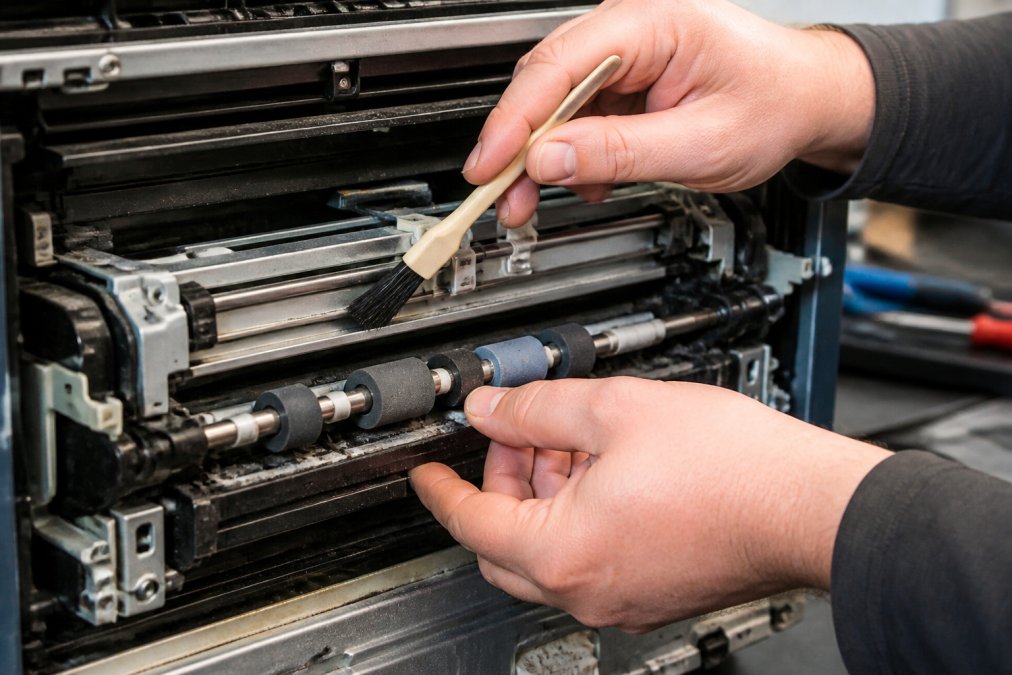
Monitor for warning signs: frequent paper jams despite proper loading, inconsistent paper feeding, or error messages about paper detection. These indicate paper path degradation requiring immediate attention.
Firmware updates and software-hardware integration
Printer firmware controls color profile management and mechanical operation. Outdated firmware introduces bugs, security vulnerabilities, and compatibility issues. Request information about the manufacturer's firmware update schedule and process. Can you update remotely, or does it require factory service? How frequently do they release updates?
Test integration with your specific design tools before purchase. Incompatibility issues introduce print errors, color mismanagement, and workflow disruptions.
Long-Term Cost of Ownership vs. Reliability
Reliability directly impacts total cost of ownership. A cheaper printer that fails frequently costs more over five years than an expensive, reliable one.
Calculate long-term costs by factoring in purchase price, maintenance and service costs, consumable replacement, downtime costs, and productivity gains from consistent operation. A printer with high upfront cost but low maintenance expenses and long component lifespan often delivers better economics than a budget option requiring frequent repairs.
For businesses like Urban Echo Tees, where customer satisfaction depends on consistent quality and reliable delivery, reliability becomes a competitive advantage. A printer that consistently produces quality output on schedule builds customer loyalty.
Verifying custom printer reliability protects your business from expensive failures and quality problems. By systematically evaluating hardware specifications, testing print quality, assessing support infrastructure, and understanding failure points, you make informed purchasing decisions. Requesting hardware validation reports, running print quality proofs with your actual designs, and evaluating the manufacturer's support infrastructure before committing to any printer purchase. This diligence transforms printer selection from guessing into a confidence-building process grounded in evidence.
Frequently Asked Questions
How do I verify custom printer reliability before placing a large order?
Request hardware specifications, validation reports, and print quality proofs from the printer. Ask for examples of completed orders and error rates. Run test prints with your actual designs to evaluate color consistency and print head longevity. Check their maintenance schedules and ask about user-replaceable parts. A reliable printer will provide technical specifications, impact testing data, and clear troubleshooting documentation. Don't hesitate to ask for references from other customers who've ordered similar quantities.
What printer hardware stress test tools should I ask about?
Reliable printers undergo thermal stress testing, duty cycle evaluation, and mechanical wear assessment. Ask your printer provider about their calibration processes, firmware validation, and performance metrics under load. Thermal testing ensures the printer handles extended printing sessions without overheating. Duty cycle ratings tell you how many pages or prints the hardware is rated for before maintenance is needed. Request documentation showing component wear testing and any third-party validation reports that confirm the printer meets industry standards.
What printer maintenance best practices should I expect from a reliable provider?
A reliable printer provider should offer clear preventative maintenance schedules, easy access to serviceable components, and comprehensive troubleshooting guides. They should explain how often key parts like print heads need replacement and provide user-replaceable parts when possible. Ask about their support response times and whether they offer firmware updates to improve performance. The provider should document common failure points and explain how to avoid unplanned downtime. Good providers give you realistic timelines for turnaround and proactively communicate if issues arise.
Why is print quality consistency important when verifying reliability?
Print quality consistency directly impacts customer satisfaction and repeat orders. A reliable printer maintains CMYK color accuracy, consistent spot colors, and uniform binding and finishes across multiple print runs. When you order custom shirts, you need the same colors and print quality on every shirt, not variations that make some look faded or poorly finished. Ask for print proofs from multiple production runs to verify repeatability. Consistent quality means fewer returns, complaints, and wasted materials, which protects your reputation and bottom line.
This article was written using GrandRanker