

How to Ensure Custom Shirt Print Quality
Table of Contents
- Prepare Your Artwork for Print
- Select the Right Fabric and Garment Quality
- Screen Printing vs DTF Quality Comparison
- Recommended Image Resolution for Custom Apparel
- Verify Design Placement and Scaling
- How to Care for Custom Printed Shirts
- Ensure Custom Shirt Print Quality Before You Order
- Conclusion
Last Updated: August 12, 2026
Prepare Your Artwork for Print
Getting custom shirt print quality right starts with proper artwork preparation. A poorly prepared design file will produce poor results regardless of printer skill or garment cost. These issues are entirely preventable.
File Format Requirements: Vector vs. Raster
Vector files are the gold standard for custom shirt printing. They use mathematical equations to define shapes and colors, scaling infinitely without quality loss. Common formats include EPS, SVG, and AI (Adobe Illustrator).
Raster files (JPG, PNG, BMP) are pixel-based and work well for photographs or complex artwork with gradients, but pixelate when enlarged.
For logos, text, and graphic designs, vector is non-negotiable. For photographic elements, raster is acceptable if resolution is sufficient.
Image Resolution and DPI Standards
DPI (dots per inch) determines print crispness. The standard for custom apparel is 300 DPI, 300 pixels per linear inch, producing sharp results.
Multiply your intended print width in inches by 300 for minimum pixel width. A 6-inch design needs at least 1,800 pixels wide; a 10-inch design needs 3,000 pixels.
For vector files, DPI doesn't apply, they render at printer resolution. But raster elements embedded in vectors still need 300 DPI.
Color Profiles and Separation
Color separation breaks your design into individual color layers so the printer knows how much ink to apply per hue. In screen printing, this means separate screens for each color.
CMYK (cyan, magenta, yellow, black) is for printing. RGB (red, green, blue) is for screens. Always convert to CMYK before submitting to avoid color shifts and loss of vibrancy.
Provide artwork with a transparent background (PNG with transparency or vector files with no background layer) so the printer can place your design cleanly on any shirt color without halos.
Select the Right Fabric and Garment Quality
The garment matters as much as the printing technique. High-quality design on cheap fabric feels cheap and won't last.
Cotton vs. Polyester Considerations
Cotton is preferred for custom printed shirts. It breathes, feels soft, and absorbs moisture naturally. Cotton holds ink better than synthetics, water-based and plastisol inks bond effectively to cotton fibers. A 100% cotton shirt with quality inks maintains appearance through 50+ washes.
Polyester offers durability and moisture-wicking for athletic wear but requires different ink types. Synthetic fibers don't absorb ink the same way, so print sits on the surface, potentially cracking or peeling if stretched.
Cotton-polyester blends (50/50 or 65/35) balance comfort, durability, and printability. They're more affordable than 100% cotton while providing good ink adhesion and comfort.
Garment Weight and Durability
Garment weight is measured in ounces per square yard. Heavier shirts (5.5 oz or more) feel substantial, hold shape better, and last longer. Lightweight shirts (4.5 oz or less) are cheaper and more breathable but may shrink more and wear out faster.
For custom printed shirts intended as gifts or keepsakes, heavier weight is worth the investment. Durability also depends on construction: double-stitched seams, reinforced shoulder seams, and quality neckline binding extend lifespan.
Screen Printing vs DTG Quality Comparison
Two primary methods dominate custom apparel: screen printing and direct-to-garment (DTG) printing.
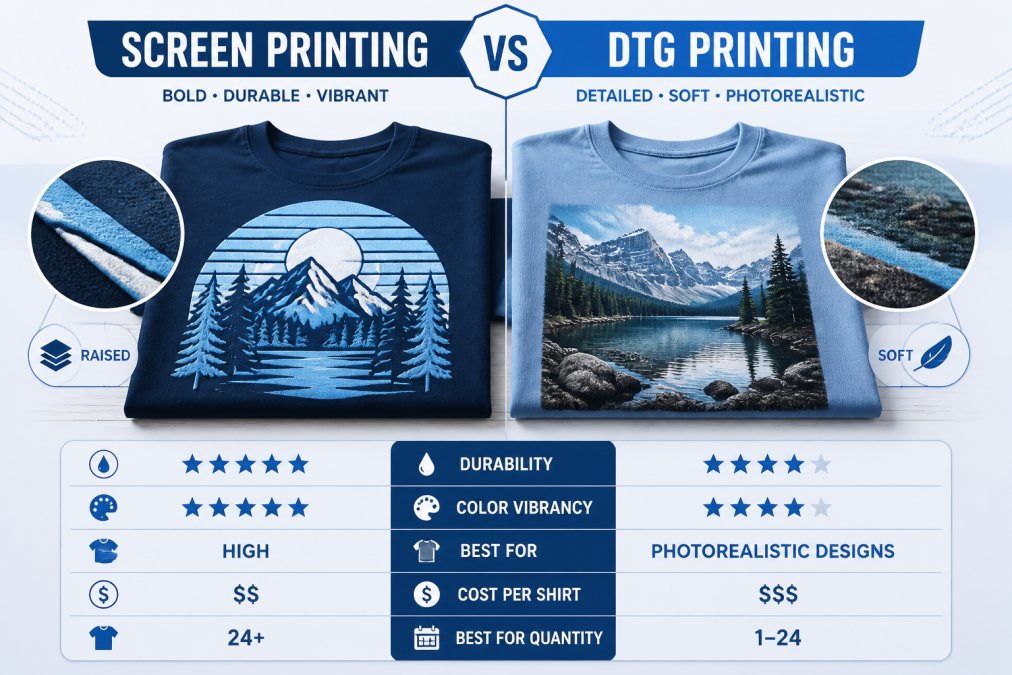
Screen printing uses mesh screens and squeegees to push ink through fabric. Each color requires a separate screen, making multi-color designs more expensive. However, screen printing excels at producing consistent, high-opacity prints that last 50+ washes.
DTG printing works like an inkjet printer but prints directly onto fabric. It handles unlimited colors in a single pass, ideal for photorealistic designs. DTG is faster for small orders and requires no screen setup, enabling shorter turnaround times.
The trade-off: DTG inks sit on fabric rather than bonding into it like screen printing inks. DTG prints may show more fading after 30-40 washes, while screen-printed designs last 50+ washes with proper care.
Ink Types and Environmental Impact
Plastisol inks are standard in screen printing. They're thick, opaque, and produce vibrant colors that last. Plastisol is PVC-based, requires high heat to cure, and is durable and affordable but contains chemicals requiring proper disposal.
Water-based inks are more environmentally friendly. Made from water and pigments, they cure at lower temperatures and wash out of screens easily. Water-based inks produce a softer hand-feel and are better for sensitive skin but don't work as well on dark fabrics without pre-treatment.
DTG inks are typically water-based or hybrid formulations. They're absorbed into fabric rather than sitting on top, producing a soft feel similar to water-based screen printing.
For environmental impact, water-based inks are the clear winner. They produce less chemical waste, require less energy to cure, and are safer to handle.
Print-on-Demand vs. Bulk Screen Printing Trade-Offs
Print-on-demand DTG services excel at small orders. You can order 1 or 100 shirts without minimum quantities. Turnaround is fast (5-10 business days typical), with no upfront screen setup cost.
Per-unit cost is higher for small orders. A single custom shirt might cost $15-20 in production, whereas bulk screen-printed orders might drop to $5-8 per shirt at 50+ units.
Bulk screen printing requires minimum orders (often 12-24 pieces) and involves creating screens for each color. Once screens are made, per-unit cost drops significantly. For orders of 25 or more, screen printing is almost always cheaper per shirt with more consistent quality.
Recommended Image Resolution for Custom Apparel
For raster images, 300 DPI is standard. For vector files, resolution is irrelevant because they scale infinitely.
Calculate pixel dimensions by multiplying intended print width in inches by 300. A 5-inch design needs 1,500 pixels wide minimum; a 12-inch design needs 3,600 pixels.
Vector files can resize to any dimension without quality loss. If embedding photographs or complex raster artwork, ensure raster elements are at least 300 DPI at final print size.
Verify Design Placement and Scaling
Where your design sits on the shirt matters. A design too close to the neckline looks cramped. Placement too low appears unbalanced.
Bleed, Registration, and Color Matching
Bleed refers to how close your design can be to print area edges. Most printers have a minimum bleed of 0.25 inches from the design edge.
Registration is the alignment of multiple colors in screen printing. High-quality screen printers maintain registration within 1/32 inch, tight enough that most people won't notice minor misalignment.
Color matching is where perception meets reality. Your screen displays RGB colors, but the printer works in CMYK. Pantone color matching (using numbered color standards) is more reliable than matching screen colors. If color accuracy is critical, request a physical color swatch or proof before the full order.
Troubleshooting Common Print Defects
Pixelation or blurriness indicates insufficient DPI or a raster file scaled too much. Solution: provide higher-resolution file or use vector instead.
Color shifting usually means the file wasn't converted to CMYK. Solution: convert to CMYK before submitting.
Ink cracking happens when print is too thick or wrong ink type is used for the fabric. Solution: discuss ink type with your printer and ensure they're using the right formula for your fabric.
Fading after a few washes suggests low-quality ink or improper curing. Solution: verify printer's quality standards and ask about curing process.
Ink peeling or flaking indicates poor ink adhesion to fabric. Solution: confirm the printer pre-treats the garment and uses appropriate ink for the fabric type.
How to Care for Custom Printed Shirts
A quality custom print is only as good as how the wearer maintains it. Proper care extends design life and keeps colors vibrant.
Wash-Test Durability Protocols
Before committing to a large order, request a sample shirt and wash it using your typical laundry routine. Wash the sample in warm water with regular detergent, then dry it. Repeat 5-10 times. Examine the print for fading, cracking, peeling, or color shifting. Quality screen-printed designs should show minimal change after 10 washes.
Print Durability and Wash Fastness Standards
Wash fastness measures how well a print resists fading through repeated washing, on a scale of 1-5, with 5 being most durable.
- Grade 5: Minimal fading after 50+ washes (screen printing with quality plastisol or water-based inks)
- Grade 4: Slight fading after 30-40 washes (DTG printing, lower-quality screen printing)
- Grade 3: Noticeable fading after 15-20 washes (poor quality or incorrect ink for fabric type)
- Grade 1-2: Significant fading or peeling within 5-10 washes (defective print or wrong method)
Ask your printer what wash fastness grade they guarantee. Reputable printers should confidently state Grade 4 or 5.
Wash temperature matters. Hot water fades prints faster than cold water. Chlorine bleach is devastating to printed designs. Gentle detergent and cold water maximize print longevity.
Ensure Custom Shirt Print Quality Before You Order
Don't wait until the full order arrives to discover quality issues. Verify quality upfront through samples and proofs.
Request Samples and Proofs
A proof is a digital mockup showing how your design will look on the shirt. Most printers provide digital proofs for free. Review carefully: check color accuracy, design placement, and sizing.
A sample shirt is an actual printed garment. Ordering a sample costs extra (typically $25-50) but is invaluable for assessing real quality. You can feel ink texture, see how colors actually render, and test durability through washing.
For orders of 25 or more, a sample is strongly recommended. It's cheap insurance against ordering 100 shirts that disappoint.
Color Accuracy and Screen Verification
Color on your computer screen won't match the print. Monitors display RGB; printers use CMYK or spot colors.
Request that your printer use Pantone color matching for critical colors. Pantone is an industry standard where each color has a specific number. When you specify "Pantone 186 Red," every printer should produce the same red, removing guesswork from color translation.
For photorealistic designs or complex artwork with many colors, exact color matching is harder. Request a physical color swatch or sample before the full run.
Urban Echo Tees provides digital proofs and sample options for all orders. For custom designs where color accuracy is critical, like teacher appreciation shirts or wedding party apparel, we recommend reviewing a sample before committing to full production.
Custom shirt print quality is achievable when you understand technical requirements upfront. Prepare artwork in the right format and resolution, select quality fabrics and garments, choose the printing method matching your needs, and verify quality through samples and proofs before ordering.
Urban Echo Tees specializes in small to medium custom orders where quality control is personal. Whether ordering shirts for a teacher appreciation event, family trip, or wedding party, we handle the technical details so you don't have to. Review our portfolio of completed orders and request a sample to see the quality difference firsthand.
Frequently Asked Questions
Is 300 DPI good for custom shirt printing?
Yes, 300 DPI is the industry standard for custom shirt print quality and ensures sharp, detailed designs without pixelation. For designs that will be scaled larger than 4 inches, maintain 300 DPI to preserve clarity. If your artwork is smaller, you may increase DPI to 600 for extremely fine details, but 300 DPI is sufficient for most custom apparel applications and balances quality with file size.
What lasts longer, DTF or screen print?
Screen printing typically lasts longer under heavy washing and wear, especially with plastisol inks that cure deeply into fabric fibers. DTF (direct-to-film) prints offer excellent durability for 50-75 washes with proper care, while screen prints can withstand 100+ washes. However, DTF excels on polyester blends and complex multicolor designs. For maximum longevity, screen printing with water-based or plastisol inks on 100% cotton is your best choice.
How do I choose the right fabric for custom printing?
Cotton holds screen-printed designs best due to its natural fiber structure and ink absorption. For DTF printing, cotton-polyester blends (50/50 or 60/40) work well because DTF bonds to synthetic fibers effectively. Consider garment weight: heavier fabrics (6+ ounces) provide better durability and print stability. Always check the printer's fabric recommendations, as different printing methods perform differently on various compositions.
What should I do to ensure my custom shirt colors match my design file?
Request a physical proof or sample before full production. RGB colors on your screen display differently than CMYK inks on fabric, so ask your printer to provide a proof showing actual printed color. Verify that your design file uses CMYK color profiles, not RGB. Many quality issues stem from color mismatch, so always compare the proof against your original design and approve it before proceeding with your order.
This article was written using GrandRanker