

How to Design Custom Teacher Shirts: A 2026 Guide
Table of Contents
- Start With a Plan: What You'll Need to Design Custom Teacher Shirts
- Teacher Shirt Design Ideas That Go Beyond the Apple
- Fonts, Colors, and Layout: Making the Design Readable
- The Best Software for Custom Apparel Design: From Free Tools to Pro Options
- Screen Printing vs Direct-to-Garment: Which Method Fits Your Order
- Avoiding Copyright Trouble and School Branding Pitfalls
- Frequently Asked Questions
Last Updated: October 6, 2026
Start With a Plan: What You'll Need to Design Custom Teacher Shirts
Designing custom teacher shirts starts with one question: who is wearing it and why? A kindergarten appreciation gift looks nothing like a staff-wide spirit shirt. Answer that first and every other choice gets easier.
This guide walks through the full process, from concept to print method, so you can design custom teacher shirts people actually wear past June.
Gather these before you open any design tool:
- The teacher's name, grade level, or subject
- Your shirt color and style (tee or sweatshirt)
- A rough budget per shirt
- The event date and your deadline
Teacher Shirt Design Ideas That Go Beyond the Apple
The apple and pencil are fine, and already on every shirt in the staff lounge. For a teacher tee that stands out, pull ideas from the teacher's actual classroom life.
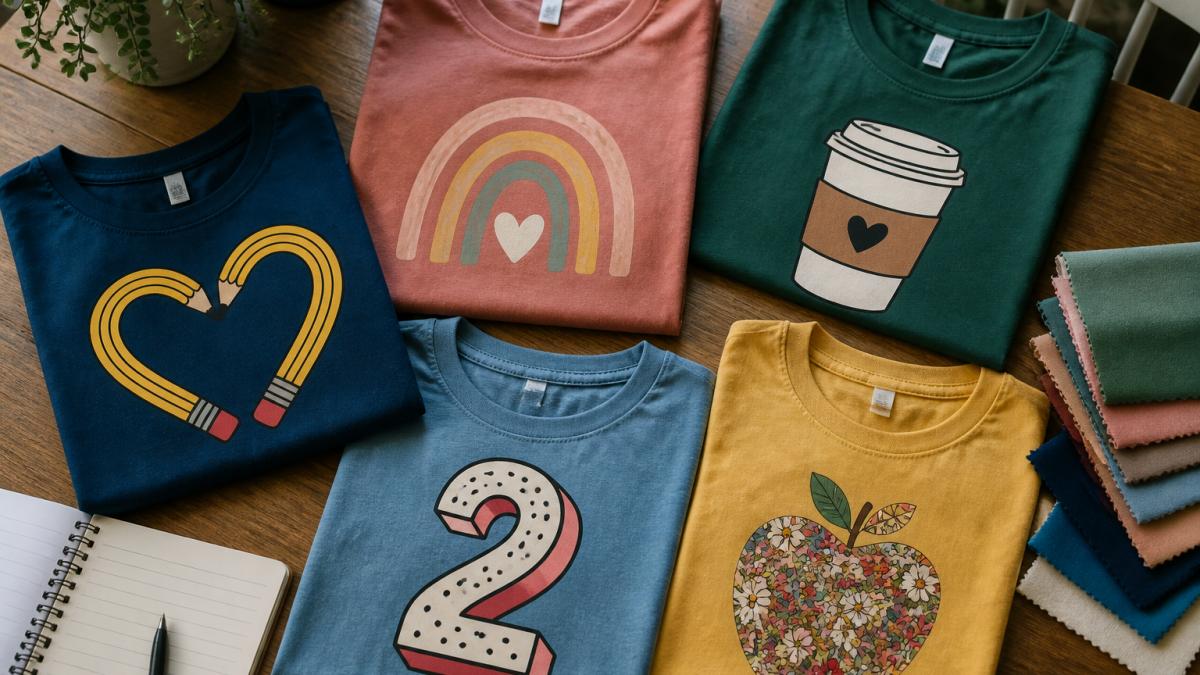
Here are directions that work well:
- Subject pride: "World's Okayest Chemistry Teacher" or "History Nerd"
- Classroom humor: "It's a Good Day to Learn Something New"
- Team spirit: matching shirts for the whole grade-level team
- Milestone designs: first year, tenth year, retirement
A good teacher shirt design idea feels personal. If you can swap in another profession and it still makes sense, it is too generic.
Personalizing With Grade Level, Subject, or Role
The fastest way to make a shirt feel custom is to name the role. "Teacher" is fine. "Kindergarten Teacher" is better. "Mrs. Alvarez's Kindergarten Class" is best.
Grade level signals belonging, a preschool teacher and a high school teacher have very different days, and naming it tells people exactly who the shirt is for.
Roles to consider:
- Grade level (kindergarten, 1st grade, 2nd grade)
- Subject (math, science, reading, art)
- Specialty (resource room, special education, ESL)
- Support staff (teacher assistant, aide, counselor)
Slogans, Messages, and Inside Jokes That Work
Short slogans beat long paragraphs. A shirt slogan should be readable across a room.
Strong teacher messages tend to:
- Use humor the staff already shares
- Reference a class inside joke
- Nod to the reality of the job ("Coffee First, Then Teach")
- Stay positive without being cheesy
Keep it under eight words. If it needs explaining, it is too long for a shirt.
Fonts, Colors, and Layout: Making the Design Readable
Readability is the whole game. A beautiful font nobody can read from three feet away is a failed design, so pick fonts and colors that hold up on fabric, not just on screen.
Font tips:
- Use two fonts max: one bold for the main line, one simple for details
- Avoid thin, delicate scripts for small text
- Test the design at actual size before you commit
Color tips:
- High contrast wins (dark text on light shirts, light text on dark shirts)
- Limit the palette to three colors
- Remember that screen colors and printed colors differ
A common mistake is cramming the design edge to edge. Leave breathing room around the artwork and text. It looks cleaner and prints better.
The Best Software for Custom Apparel Design: From Free Tools to Pro Options
Most teacher shirt projects do not need pro software, just a tool that exports a clean, print-ready file. The right pick depends on your skill level and order size.
Here is how the common options actually stack up:
| Tool | Best For | Skill Level | Cost | Export Formats |
|---|---|---|---|---|
| Canva | Teachers, parents, quick gifts | Beginner | Free tier; paid tier unlocks background remover and brand kit | PNG, JPG, PDF |
| Placeit | Mockups and template-driven designs | Beginner | Free previews; paid downloads | PNG, JPG |
| Adobe Express | Fast text-and-graphic layouts | Beginner to intermediate | Free tier; paid tier for premium assets | PNG, JPG, PDF |
| Inkscape | Print-ready vector art on a budget | Intermediate | Free, open source | SVG, PDF, EPS |
| Adobe Illustrator | Professional vector work, large orders | Advanced | Paid subscription | AI, EPS, SVG, PDF |
| Affinity Designer | One-time-purchase vector editing | Intermediate to advanced | One-time license | SVG, EPS, PDF |
For a single gift or small team order, Canva or Adobe Express is plenty: start from a blank canvas or template, drop in text, upload a graphic, and export a PNG in under an hour.
Kindergarten Teacher Sweatshirt - Perfect Gift for Educators →
A Start-to-Finish Design Workflow
Most tutorials stop at "open a design tool." Here is the full path from idea to printable file:
- Lock the concept. Write one sentence: who wears it, what it says, where it is worn. Everything else serves that sentence.
- Pick the garment and print area. A standard front print is roughly 11 to 12 inches wide; a left-chest print is about 3 to 4 inches. Know your canvas before you design.
- Set up the file at final size. Create the canvas at the actual print dimensions at 300 DPI. Do not design small and scale up later.
- Build in layers. Keep text, artwork, and background separate so you can move or recolor one without disturbing the rest.
- Choose fonts and colors. Two fonts maximum. Three colors maximum unless the printer confirms otherwise.
- Check contrast and legibility. Zoom out to thumbnail size. If you cannot read the main line, the shirt will fail across a hallway.
- Export the right format. PNG with a transparent background at 300 DPI for DTG or heat transfer. Vector (SVG, EPS, PDF) for screen printing.
- Request a proof. Ask for a digital mockup on the actual shirt color, and a physical sample for orders over about 50 units.
File Prep Details That Save Reprints
- Resolution: 300 DPI at final print size is the safe floor for raster art. 150 DPI will look soft on fabric.
- Color mode: Design in RGB for on-screen tools, but expect the printer to convert to CMYK or spot colors. Ask which one they use.
- Transparency: Keep the background transparent on PNGs. A white box behind your art will print as a white box.
- Bleed and margins: Leave at least a quarter-inch of empty space around the design so nothing gets clipped by the platen.
Canva's print-size and DPI guidance
Inkscape download and vector basics
Screen Printing vs Direct-to-Garment: Which Method Fits Your Order
Three print methods cover almost every teacher shirt project: screen printing, direct-to-garment (DTG), and heat transfer (vinyl or transfer paper).
Here is how they compare on the factors that actually drive your decision:
| Factor | Screen Printing | Direct-to-Garment (DTG) | Heat Transfer (Vinyl / Transfer Paper) |
|---|---|---|---|
| Best quantity | Roughly 24+ per design | 1 to about 24 per design | 1 to about 50 per design |
| Setup cost | Screen and setup fee per color | None | None for transfer paper; cutting time for vinyl |
| Per-shirt cost at low quantity | High | Moderate | Low to moderate |
| Per-shirt cost at high quantity | Lowest | Moderate | Moderate |
| Color capability | One screen per color; spot colors | Full color, photographic detail | Full color for transfer paper; limited colors for vinyl |
| Feel on fabric | Ink sits on top; can feel thick | Softer, ink soaks into fabric | Vinyl can feel stiff; transfer paper is softer |
| Durability | Very long-lasting | Good with proper care | Vinyl is durable; transfer paper can crack over time |
| File format | Vector preferred (SVG, EPS, PDF) | PNG at 300 DPI, transparent background | PNG at 300 DPI, or cut file (SVG) for vinyl |
How Cost Actually Breaks Down
Print pricing is driven by quantity, color count, and setup.
- Setup fees: Screen printing charges a setup fee per color per screen. A three-color design on a 30-shirt order carries three setup fees. DTG and heat transfer typically have no setup fee.
- Quantity breaks: Screen printing gets cheaper per shirt as quantity rises because setup is spread across more units. DTG and heat transfer stay relatively flat per shirt.
- Color count: Each additional screen color adds cost and setup time in screen printing. DTG and transfer paper print full color at no extra per-color charge.
- Garment cost: The blank shirt is often the largest line item. A basic cotton tee and a premium ring-spun tee can differ substantially in price, and that difference multiplies across the order.
- Rush fees: Tight deadlines usually add a surcharge. Build in at least two to three weeks for a typical order, longer around back-to-school and teacher appreciation week.
File Prep by Method
- Screen printing: Vector art is strongly preferred. If you only have a raster file, the shop may charge a conversion fee. Keep colors to a small, defined palette.
- DTG: A PNG at 300 DPI with a transparent background is the standard. Full-color and photographic designs work well.
- Heat transfer paper: Mirror the image before printing, and use a PNG at 300 DPI on a transparent background.
- Heat transfer vinyl: You need a cut file (SVG) with clean, closed paths. Complex gradients do not work in single-color vinyl.
Request a proof first. It catches size, spelling, and color problems before the whole order is printed.
Custom apparel printing methods overview
Heat transfer vinyl application basics
Avoiding Copyright Trouble and School Branding Pitfalls
Copyright and school branding trip up more custom shirt projects than bad design.
Watch for these:
- Copyrighted characters and logos: Skip them unless you have a license
- School mascots and logos: Get written approval from the school first
- Song lyrics and quotes: Many are protected
- Photos of people: Get consent before printing a face
When in doubt, design something original. Your own slogan and artwork avoid the whole problem.
Our Kindergarten Teacher Sweatshirt and 1st Grade Teacher Sweatshirt are soft, breathable, and built for classroom days.
Get started with Urban Echo Tees and give the educator in your life something they will wear all year.
Frequently Asked Questions
What are the best design ideas for teacher shirts?
Start with the teacher's grade level or subject, then add a personal touch. Popular directions include a rainbow or crayon theme for elementary teachers, a coffee-and-chaos slogan for middle school, and subject-specific jokes for high school. You can also build a design around a team name like 'Kindergarten Social Club' or 'Resource Room Magic' to make it feel like a crew. Pick one clear message and one visual element, then let the shirt breathe.
Can I design custom teacher shirts without a minimum order?
Yes. Urban Echo Tees produces shirts one at a time, so you can order a single sweatshirt or a small batch for a grade-level team. Orders typically ship within 3-7 business days, which works well for teacher appreciation events and end-of-year gifts. Just double-check the size chart before you order, since unisex cuts often run slightly small.
What software is best for designing custom T-shirts?
For most teachers and parents, Canva is the easiest starting point because it has free teacher-themed templates and a drag-and-drop editor. If you need more control over vector artwork, Inkscape is a free option, and Adobe Illustrator is the professional standard. The key is to export your final file at 300 DPI in PNG or PDF format.
What are the most popular color combinations for educator tees?
Rainbow palettes remain the top choice for elementary teachers, especially on a white or heather gray base. For a more subdued look, navy and mustard yellow or sage green and cream are popular. If the shirt is a gift, consider the teacher's classroom colors or favorite sports team palette. Always check contrast between text and background, because a light font on a light shirt will disappear in photos and in person.